
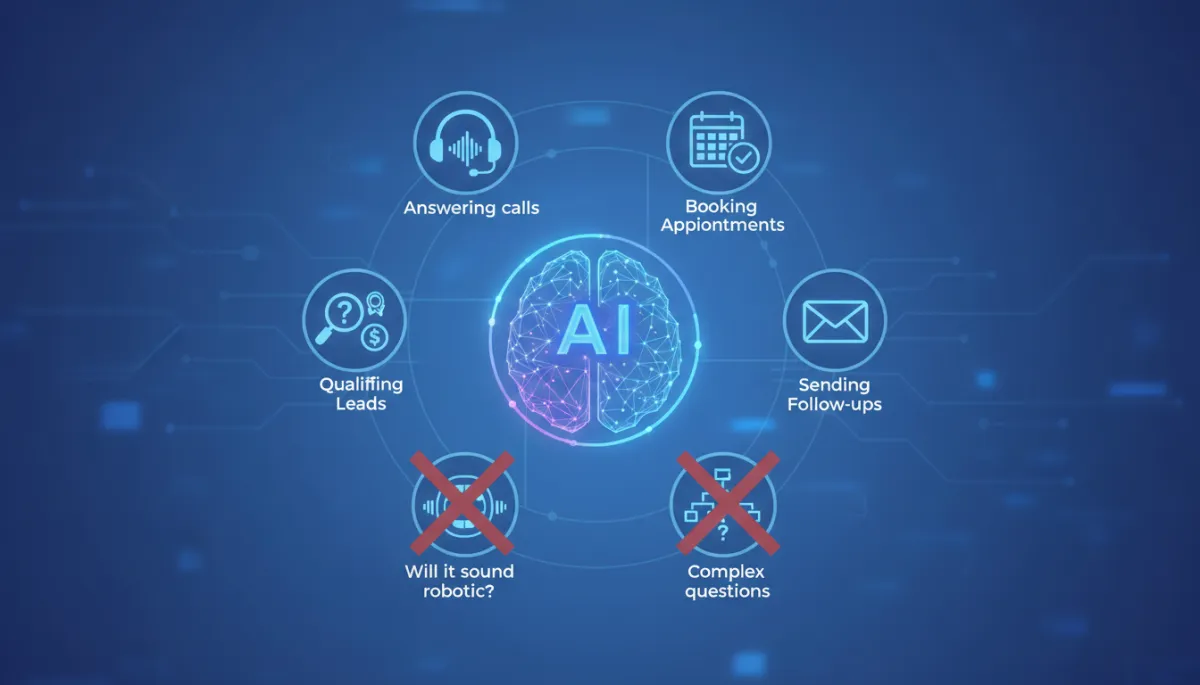
AI Receptionist: What It Does and Doesn't Do
Small Business, Customer Service, AI Receptionist
What an AI Receptionist Actually Does — and Doesn't Do
AI receptionists are quickly moving from “nice-to-have” to “essential” for many small businesses. But between bold marketing claims and horror stories about robotic voices, it can be hard to know what these systems really do in day-to-day operations. This article sets realistic expectations, so you can decide whether an AI receptionist is the right fit for your business, your customers, and your team.

Why Small Businesses Are Turning to AI Receptionists
For many small businesses, the phone is still the front door. New customers call to ask questions, existing clients call to reschedule, and suppliers call with time-sensitive updates. Yet staffing that “front door” is expensive and difficult, especially if you are trying to cover early mornings, evenings, weekends, or multiple time zones. Missed calls often mean missed revenue, frustrated customers, or both.
AI receptionists promise a middle ground: a system that can answer every call, follow your instructions, and handle common tasks without you having to hire, train, and manage another employee. When implemented correctly, they can improve responsiveness, reduce interruptions for your team, and create a more consistent customer experience. When implemented poorly—or over-sold—they can create friction, confusion, and disappointment. The difference often comes down to understanding exactly what an AI receptionist can and cannot do, and configuring it accordingly.
What an AI Receptionist Can Handle Reliably
Modern AI receptionists combine speech recognition, natural language understanding, and integrations with your calendar, CRM, and communication tools. When properly set up, they can reliably execute a range of tasks that follow clear rules and predictable workflows. Below are the core responsibilities most small businesses can expect an AI receptionist to manage effectively day after day.
1. Answering and Routing Calls Professionally
At the most basic level, an AI receptionist answers incoming calls with a consistent, on-brand greeting, then guides the caller to the right next step. Instead of ringing endlessly, going straight to voicemail, or being answered in a rush, every call is handled in a predictable, professional way. Typical capabilities include:
- Greeting callers with a customized script that reflects your brand voice and key information (hours, location, services).
- Asking clarifying questions such as “Are you a new or existing client?” or “Is this regarding sales, support, or billing?” to understand intent.
- Transferring calls to the correct person or department based on your routing rules and availability, or taking a detailed message if no one is available.
Unlike legacy phone trees (“Press 1 for sales, press 2 for support”), newer AI receptionists can understand spoken responses in natural language—“I need to change my appointment,” “I'm interested in a quote,” or “I have a question about my invoice”—and route accordingly. This reduces friction and makes the interaction feel closer to speaking with a human assistant, while still operating within clear boundaries you define in advance.
2. Booking, Changing, and Confirming Appointments
Appointment scheduling is one of the strongest use cases for an AI receptionist, particularly for service-based businesses such as clinics, salons, home services, and professional practices. With a direct integration to your calendar or booking system, the AI can:
- Offer available time slots that match your business hours, staff schedules, and service durations.
- Capture required details such as name, contact information, service type, and any notes you specify (for example, “Is this your first visit?”).
- Confirm, reschedule, or cancel existing appointments based on your policies and availability, while updating your calendar in real time.
Because this process is largely rules-based—if slot is free, book it; if not, offer alternatives—AI systems perform very well. They do not get flustered by back-and-forth negotiation over times, and they can enforce your rules consistently (such as minimum notice periods or limits on last-minute cancellations). This can reduce no-shows, prevent double-bookings, and free your team from constant calendar management.
3. Qualifying and Capturing New Leads
Another high-value area is lead qualification. For many small businesses, the difference between a profitable marketing campaign and a wasted budget comes down to how quickly and consistently new leads are followed up on. An AI receptionist can help by:
- Asking a short, structured set of qualification questions (for example, location, budget range, project timeline, property type, or service urgency).
- Determining whether a caller fits your ideal client profile based on rules you define (for instance, “We only serve within a 30-mile radius” or “We do not handle emergency calls after 9 p.m.”).
- Routing high-value leads directly to a salesperson or owner, while capturing and logging details from less qualified inquiries for later review.
Because the AI follows the same script every time, you avoid situations where a busy staff member forgets to ask a key question or fails to capture contact information accurately. Over time, you can refine the questions and rules based on which leads convert, making your intake process steadily more effective without retraining staff each time you make a change.
4. Sending Follow-Up Messages and Reminders
Many AI receptionist platforms integrate with email, SMS, or messaging tools, allowing them to trigger automated follow-ups based on call outcomes. Examples include:
- Sending appointment confirmations and reminders with date, time, and location details, plus any preparation instructions you specify.
- Delivering a summary of a new lead’s information to your sales inbox or CRM, so your team can follow up with context rather than starting from scratch.
- Sharing links to FAQs, intake forms, or payment portals immediately after a call, reducing back-and-forth and manual data entry.
These follow-ups are simple but powerful. They reduce no-shows, improve show rates for consultations, and help callers feel taken care of without adding extra administrative work for your staff. Because the AI triggers these messages automatically based on call context, your processes become more consistent and less dependent on who happened to answer the phone that day.

Clear call analytics help owners see how AI receptionists convert inquiries into booked appointments.
5. Handling Routine Questions and Basic FAQs
AI receptionists can also answer many of the straightforward questions that occupy your phone lines every day. For example:
- “What are your hours?” — The AI can respond with current hours, special holiday hours, or instructions for emergencies if you provide that information in advance.
- “Where are you located?” — The AI can give your address, parking details, and even landmark-based directions if scripted accordingly.
- “Do you offer [specific service]?” — If your services are clearly documented, the AI can confirm what you offer and, when appropriate, suggest booking a consultation.
The key is that these answers come from information you provide and maintain. The AI does not “invent” your policies or services; it surfaces them quickly and consistently, freeing your team from repeating the same details hundreds of times per month.
The Real Limitations of AI Receptionists (and Why They Matter)
While AI receptionists are powerful within their lane, they are not a magic solution for every customer interaction. Understanding their limitations is critical to avoiding disappointment and maintaining a positive experience for your callers. The most effective deployments are built around clear boundaries: what the AI should handle, when it should hand off to a human, and how it should communicate those transitions to callers.
1. They Struggle With Highly Nuanced or Emotional Conversations
AI has improved dramatically in understanding natural language, but it still lacks genuine empathy and human judgment. Situations that involve sensitive topics, strong emotions, or complex trade-offs are not a good fit for a fully automated receptionist. Consider scenarios such as:
- A distressed patient calling a medical practice with urgent concerns that may require triage or reassurance beyond a scripted response.
- A long-time client calling to negotiate a sensitive billing issue or express dissatisfaction with a recent service.
- A complex, multi-party situation where context from past interactions is crucial to making the right decision.
In these cases, the AI should quickly recognize that the conversation is outside its scope and escalate to a human. You can support this by defining clear rules: for example, any mention of “emergency,” “complaint,” or “urgent medical issue” automatically triggers a transfer to an on-call staff member or a specific voicemail workflow with clear instructions. Expecting AI to “handle it all” in emotionally charged situations is likely to frustrate callers and damage trust.
2. They Depend on the Quality of Your Information and Rules
AI receptionists are only as effective as the instructions and data you provide. If your business policies are unclear, your service offerings are constantly changing, or your calendar and CRM are not kept up to date, the AI will inevitably give outdated or inconsistent information. Common pitfalls include:
- Out-of-date hours or pricing still loaded into the system, leading to confusion when customers arrive or receive invoices.
- Staff calendars that are not maintained, causing double-bookings or promises that cannot be kept.
- Vague or contradictory rules about who should receive which types of calls, making routing unreliable.
Implementing an AI receptionist is an opportunity to clarify and document your processes. The more precise and up-to-date your information, the more effective the AI becomes. If you treat it as a “set and forget” system without ongoing maintenance, performance will degrade over time—just as it would with a human team working from outdated instructions.
3. They Are Not Experts in Your Field
Even the most advanced AI receptionist is not a subject-matter expert. It does not replace your legal advice, medical judgment, financial planning expertise, or technical troubleshooting skills. It can provide high-level information that you have approved, but it should not be allowed to improvise answers to specialized questions. For example:
- A law firm’s AI receptionist can explain how to schedule a consultation, but it should not interpret legal documents or provide case-specific advice over the phone.
- A veterinary clinic’s AI can share opening hours and appointment availability, but it should not diagnose symptoms or recommend medication without a vet’s input.
A healthy boundary is to let the AI handle logistics and basic information, while clearly signaling that any detailed advice or decisions will be made by qualified professionals. This protects both your clients and your liability exposure.
4. They Cannot Fully Replace Relationship-Building
Many small businesses differentiate themselves through personal relationships: knowing customers by name, remembering their preferences, and offering small gestures that build loyalty over time. While AI can simulate some aspects of personalization—such as greeting a returning caller by name if their number is recognized—it cannot truly build rapport in the same way a long-time staff member can. Over-automating your front desk risks making your business feel generic or impersonal, especially for long-standing clients who are used to speaking with a familiar voice.
A practical approach is to use AI for the initial triage and routine tasks, then ensure that key clients or high-value relationships are quickly connected to a human. For example, you might configure your system so that calls from VIP customers always ring through to a specific staff member after a brief, friendly greeting from the AI. This way, you preserve the relationship while still benefiting from automation for the broader call volume.
Common Concern #1: Will It Sound Robotic?
One of the most frequent concerns small business owners raise is whether an AI receptionist will sound obviously artificial, frustrating callers or making the business appear unprofessional. This fear is understandable, especially if your reference point is outdated text-to-speech systems with flat intonation and awkward pauses. The reality today is more nuanced: voice quality can be very natural, but it depends on the technology you choose and how you configure it.
How Modern AI Voices Actually Sound
Modern AI receptionist platforms typically use advanced neural text-to-speech engines that can produce voices with natural pacing, intonation, and even subtle emotion. Many systems offer multiple voice options—different genders, accents, and tones—so you can choose one that aligns with your brand. When callers hear these voices, they often assume they are speaking with a highly trained call center agent rather than a machine, at least for short, straightforward interactions.
That said, there are still telltale signs: slightly too-perfect pronunciation, occasional mispronunciation of uncommon names, or minor timing quirks in more complex sentences. For most routine interactions—“Thank you for calling,” “Let me check availability,” “I can help you schedule that”—these differences are subtle and rarely cause friction. The more conversational and open-ended the interaction becomes, the more likely callers are to notice they are speaking with an AI, especially if the script is not carefully designed.
Design Choices That Affect How "Human" It Feels
Beyond the underlying voice engine, your scripting choices have a major impact on how natural the AI feels. Some best practices include:
- Using concise, conversational language instead of long, formal sentences. Short prompts are easier for callers to follow and sound more natural when spoken by AI.
- Avoiding jargon or overly complex phrasing, which can highlight any minor timing issues in the synthesized voice.
- Introducing gentle pauses where a human would naturally pause, such as before offering options or confirming details.
It is also important to decide whether you want the AI to identify itself as such. Some businesses prefer transparency—“I'm your virtual receptionist”—to manage expectations. Others use more neutral language, focusing on the service rather than the technology. There is no single right answer, but being intentional about this choice helps align the experience with your brand values.

The best experiences blend AI efficiency with human oversight and support.
Common Concern #2: What About Complex Questions?
Another frequent question is how an AI receptionist will handle complex or unexpected questions. For example, what happens when a caller asks about a unique situation that is not covered in your standard FAQs, or when multiple issues are raised in a single call? The honest answer is that AI receptionists are not designed to replace expert conversations. Instead, they should recognize when a question is complex and transition gracefully to a human.
Defining "Complex" for Your Business
Complexity is relative. For a hair salon, a “complex” question might be a highly specific color-correction request that depends on seeing the client's hair in person. For an accounting firm, it might be a detailed tax question that hinges on multiple factors. To configure your AI receptionist effectively, you need to define where the line is for your business. Ask yourself:
- Which questions can be answered safely and accurately from a script or knowledge base?
- Which questions always require a professional to review the situation before responding?
- Which questions fall into a gray area, where the AI should gather initial information but still hand off to a human for final guidance?
Once you have clarity, you can configure the AI to recognize certain keywords, phrases, or question patterns as triggers for escalation. For example, any mention of “legal advice,” “tax implications,” or “medical emergency” might automatically prompt the AI to say, “This is something our team needs to review personally. Let me connect you with the right person,” and then transfer or schedule a follow-up.
Gathering Context Before Hand-Off
Even when the AI cannot answer a complex question directly, it can still add value by gathering structured context before handing the call to a human. For instance, the AI might ask:
- “Can you briefly describe the issue so I can route you to the right specialist?”
- “Is this related to a past appointment or a new situation?”
- “Do you have any relevant reference numbers or documents handy?”
This information can then be passed along in a call summary or CRM note, so your staff member starts the conversation with context instead of asking the caller to repeat everything. The result is a smoother experience for the caller and a more efficient use of your team’s time, even though the AI did not provide the final answer itself.
Real-World Use Cases for Small Businesses
To bring these capabilities and limitations into focus, it is helpful to look at how different types of small businesses are using AI receptionists in practice. The following examples are based on common patterns seen across industries, illustrating both the benefits and the boundaries of automation.
Use Case 1: A Busy Dental Practice Reducing No-Shows
A three-dentist practice in a suburban area struggled with missed calls during peak hours and a growing number of no-shows. The front desk team was juggling in-person check-ins, insurance questions, and constant phone calls from patients trying to confirm or reschedule appointments. They implemented an AI receptionist with the following configuration:
- All incoming calls were answered within a few rings by the AI, which greeted patients by practice name and asked whether they were calling about appointments, billing, or something else.
- Appointment-related calls were handled directly by the AI through a calendar integration: booking new visits, confirming times, and offering rescheduling options within predefined rules (such as not double-booking hygienists).
- Any mention of severe pain, bleeding, or other emergency keywords triggered an immediate transfer to the on-call dentist or a clearly labeled emergency voicemail with instructions.
Within a few months, the practice reported fewer missed calls, a measurable reduction in no-shows due to consistent reminders, and a less stressed front desk team. At the same time, they were careful to keep clinical questions and treatment decisions firmly in human hands, using the AI only to manage logistics and triage urgency.
Use Case 2: A Home Services Company Qualifying Leads After Hours
A small HVAC and plumbing company found that many high-intent leads were calling in the evening, after their office staff had gone home. Voicemail messages were often incomplete, and by the time the team returned the calls the next day, some prospects had already booked with competitors. They adopted an AI receptionist to cover after-hours calls with a focus on lead qualification and scheduling:
- The AI answered calls with a clear explanation that the office was closed but that it could help gather details and schedule the next available appointment for non-emergency issues.
- It asked structured questions about the property type, issue description, location, and urgency, then offered appointment windows based on technician availability and service area rules.
- For true emergencies—such as active flooding or gas smells—the AI followed a different path, providing safety instructions and connecting the caller to an on-call technician or emergency line.
The result was a higher conversion rate from evening and weekend inquiries, better-prepared technicians (thanks to structured intake notes), and fewer lost opportunities. The company did not try to have the AI diagnose issues or quote complex jobs; it simply ensured that potential customers were acknowledged, qualified, and booked promptly, even when the office was closed.
Use Case 3: A Boutique Law Firm Managing Call Volume Professionally
A small law firm specializing in family law and estate planning wanted to reduce interruptions for attorneys without making the firm feel inaccessible. They implemented an AI receptionist with a strong emphasis on professionalism and boundaries:
- The AI handled initial intake for new inquiries, capturing contact details, case type, and basic background information, then offering to schedule a paid consultation or pass the information to the appropriate attorney for review.
- Existing clients calling with case-specific questions were identified by case number or other reference, and their messages were summarized and routed to the responsible attorney’s inbox or assistant for follow-up.
- The AI was explicitly instructed not to provide legal advice, interpret documents, or discuss case strategy. Any such questions triggered a polite explanation that a lawyer would review the matter directly.
Attorneys reported fewer disruptive calls during focused work blocks, while clients appreciated faster acknowledgement of their inquiries, even outside office hours. The firm carefully positioned the AI as a virtual assistant, not a replacement for legal counsel, which helped maintain trust and professionalism.
Use Case 4: A Multi-Location Salon Standardizing Customer Experience
A salon group with several locations struggled to keep call handling consistent. Some locations answered promptly and followed a precise script; others relied on busy stylists to pick up the phone between appointments. They deployed an AI receptionist to:
- Provide a unified greeting and brand voice across all locations, with location-specific details about services and pricing pulled from a central knowledge base.
- Handle most appointment bookings and rescheduling via a shared scheduling system, reducing the need for stylists to manage their own calendars by phone.
- Answer common questions about preparation (for example, “Should I wash my hair before color?”) using standardized, stylist-approved guidance.
By clearly defining what the AI should handle and what required a stylist’s input (such as highly customized color corrections), the salon group improved consistency without sacrificing the personal touch that clients received once they arrived in person.
Setting Realistic Expectations Before You Invest
If you are considering an AI receptionist for your small business, it helps to approach the decision with clear expectations and a structured plan. The goal is not to replace your team, but to support them by taking repetitive, rules-based tasks off their plate and ensuring that every caller receives a timely, professional response.
Questions to Ask Potential Providers
When evaluating AI receptionist vendors, consider asking:
- Which tasks is your system best at—call routing, scheduling, lead capture, FAQs—and which tasks do you recommend leaving to humans?
- How do you handle escalation when the AI is unsure or the caller is upset, confused, or in an emergency?
- What integrations are available with calendars, CRMs, and messaging tools we already use?
- How customizable are the scripts, voices, and business rules? Can we easily update them as our policies change?
Their answers will help you gauge whether the technology aligns with your needs and whether the vendor understands the practical realities of small business operations rather than just selling generic AI capabilities.
Preparing Your Business for a Smooth Rollout
Implementing an AI receptionist is not just a technical project; it is an operational change. To set yourself up for success:
- Map your current call flows: who calls, why they call, and how those calls are currently handled. Identify the most repetitive, rules-based parts of the process—those are prime candidates for automation.
- Clarify your policies around scheduling, cancellations, pricing inquiries, and emergencies. The clearer your policies, the more reliably the AI can enforce them.
- Communicate with your team about what the AI will and will not do. Position it as a tool to reduce busywork and interruptions, not as a threat to their roles.
A thoughtful rollout, with clear boundaries and staff buy-in, will make it easier to adjust scripts and rules based on real-world feedback without disrupting your day-to-day operations.
Bringing It All Together: What an AI Receptionist Does — and Doesn't Do
For small business owners, the most useful way to think about an AI receptionist is as a specialized, always-on assistant for your phones. It excels at:
- Answering and routing calls quickly and consistently, so fewer customers end up in voicemail limbo.
- Booking, rescheduling, and confirming appointments according to clear rules in your calendar or booking system.
- Qualifying new leads with structured questions and routing the best opportunities to your team quickly.
- Sending follow-ups and reminders automatically, improving show rates and keeping customers informed.
- Answering routine FAQs using information you provide, reducing repetitive calls and freeing staff time.
At the same time, there are important things an AI receptionist does not do well, and should not be expected to handle:
- It does not replace human empathy or nuanced judgment in sensitive, emotional, or high-stakes conversations.
- It does not invent your business policies or expert advice; it simply follows the information and rules you provide.
- It does not build deep, long-term relationships with your best customers, although it can support those relationships by handling logistics smoothly.
When you understand these strengths and limitations, you can design a system that fits your business rather than forcing your business to fit the technology. For many small companies, that means letting AI handle the “front line” of routine calls and scheduling, while ensuring that complex, sensitive, or high-value conversations are quickly escalated to the right human.
Ultimately, an AI receptionist is most effective when you view it as part of a hybrid approach: automation where it adds reliability and efficiency, paired with human expertise where it matters most. With realistic expectations and thoughtful implementation, it can help your small business answer more calls, capture more opportunities, and deliver a smoother experience for every person who reaches out—without losing the human touch that sets you apart.
