Automate Customer Onboarding: Ultimate Guide
Automation, Customer Onboarding, Efficiency, Customer Satisfaction
Automate Your Customer Onboarding Process: The Ultimate Guide to Onboarding Automation
Discover how onboarding automation can streamline your customer journey, increase operational efficiency, and elevate customer satisfaction from the very first interaction.
How Can You Automate Your Onboarding Process?
What is the onboarding process?
Customer onboarding is the structured phase where new customers are guided from initial purchase or sign-up to successful, confident use of your product or service. It includes every touchpoint that helps customers understand your value proposition, complete key setup steps, and achieve their first meaningful outcome. Done well, onboarding reduces uncertainty, builds trust, and sets the tone for a long-term relationship.
Traditionally, onboarding has relied on manual emails, ad-hoc calls, and scattered documentation. This approach is slow, inconsistent, and difficult to scale. As customer expectations for speed and clarity rise, organizations need a more reliable way to introduce customers to their offerings, demonstrate value early, and support them at every step. This is where automation becomes essential to a modern onboarding strategy.
Why should you automate customer onboarding?
Automating customer onboarding allows you to deliver a consistent, high-quality experience to every new customer, regardless of volume or time zone. Instead of relying on manual follow-ups and one-off tasks, automation orchestrates timely messages, reminders, and in-product guidance based on customer actions. This creates a predictable, repeatable journey that is easier to manage, measure, and improve over time.
For your internal teams, automation reduces repetitive work, minimizes errors, and frees up resources to focus on higher-value activities, such as strategic account conversations or complex implementation support. For customers, it shortens the time between sign-up and value realization, which is critical for both efficiency and customer satisfaction. When customers see value quickly, they are more likely to stay engaged, renew, and expand their relationship with your business.
What are the benefits of an automated onboarding process?
An automated onboarding process delivers tangible benefits across your organization. First, it dramatically improves operational efficiency. Standardized workflows ensure that every new customer receives the right steps, in the right order, without relying on manual coordination. This reduces delays, handoff issues, and miscommunication between sales, implementation, and support teams.
Second, automation enhances customer satisfaction. Customers receive proactive guidance, clear expectations, and self-service resources tailored to their context. Automated reminders prevent stalled implementations, while personalized content helps different segments progress at their own pace. Finally, automation provides data. Every interaction, milestone, and drop-off point can be tracked, enabling you to optimize the onboarding journey continuously and align it with business outcomes such as activation, adoption, and retention.
What Tools Can Streamline the Customer Onboarding Experience?
What is onboarding software and how does it work?
Onboarding software is a category of tools designed to automate, coordinate, and monitor the steps customers must take to become fully operational and successful. These platforms typically combine workflow automation, task management, communication templates, and analytics. They allow you to design standardized onboarding journeys, assign responsibilities, and trigger actions based on customer behavior or predefined milestones.
In practice, onboarding software can automatically send welcome emails, schedule kickoff meetings, generate implementation checklists, and surface in-app guidance. It can also centralize customer data, so stakeholders across sales, customer success, and support share a single view of onboarding progress. By replacing scattered spreadsheets and manual follow-ups, onboarding platforms become the operational backbone of your automation strategy for new customers.
How do you choose the right automation tools for onboarding?
Selecting the right onboarding automation tools starts with clarifying your objectives. Determine whether your primary goals are to reduce manual work, accelerate time-to-value, improve customer satisfaction, or support complex, multi-stakeholder implementations. With these priorities defined, evaluate tools based on workflow flexibility, ease of use, integration capabilities, and reporting depth. A platform that supports both simple and advanced journeys will give you room to evolve as your processes mature.
Consider the experience of your internal teams as carefully as the experience of your customers. Look for intuitive interfaces, low-code or no-code automation builders, and reusable templates. Strong support, documentation, and training resources are also critical to successful adoption. Ultimately, the right tool should enhance efficiency, reduce friction, and allow your teams to maintain a human, consultative touch while routine tasks run in the background.
Can you integrate onboarding software with your existing systems?
Effective onboarding automation depends on seamless integration with your existing technology stack. Your onboarding platform should connect to your CRM, support desk, product analytics, billing system, and communication tools. These integrations ensure that customer data flows freely, handoffs are automatic, and stakeholders always operate with accurate, up-to-date information. For example, when a deal closes in your CRM, an onboarding journey can be triggered automatically, assigning tasks and sending welcome communications without manual intervention.
Modern onboarding tools often provide native integrations, APIs, and middleware connectors to simplify this process. When evaluating platforms, confirm that they can support your current systems and anticipated future needs. Strong integration capabilities not only enhance efficiency but also create a more unified customer experience, where every interaction feels coordinated, timely, and relevant across channels.
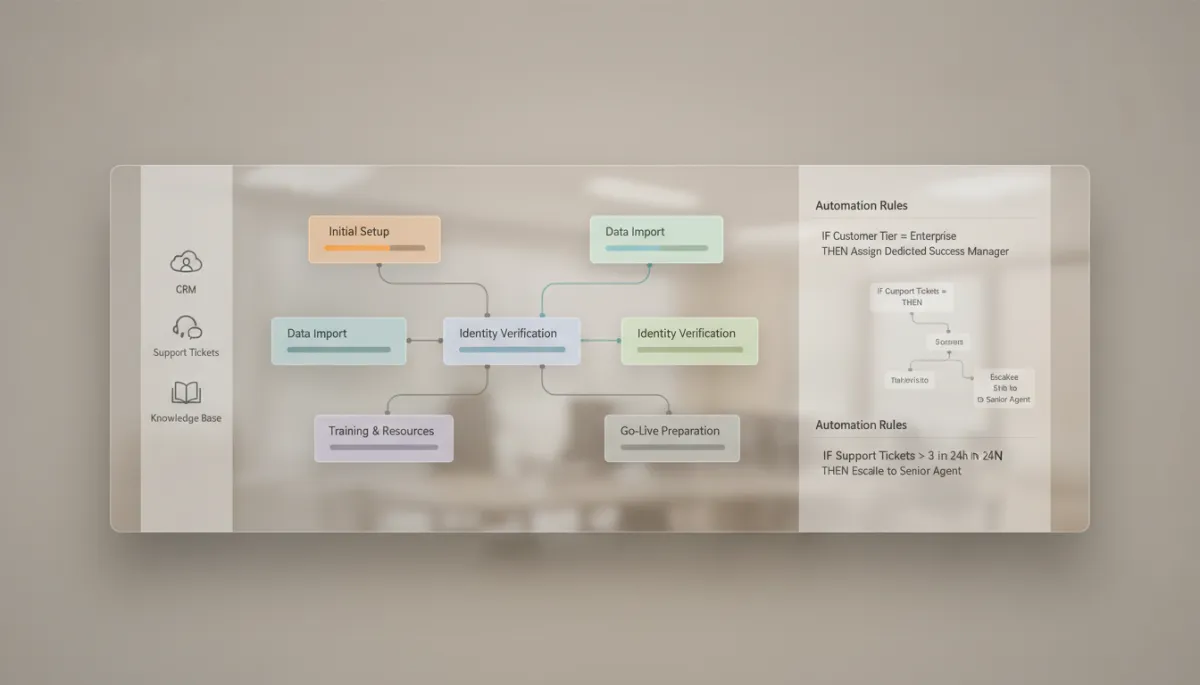
Integrated onboarding dashboards align teams, reduce manual work, and clarify customer progress.
How Do You Create an Automated Onboarding Process?
What steps are involved in creating an automated onboarding process?
Building an automated onboarding process begins with mapping your current journey from contract signature to full adoption. Document every step, stakeholder, and touchpoint, including internal tasks and customer-facing interactions. Identify bottlenecks, repetitive activities, and common points of confusion. This baseline gives you clarity on where automation can have the greatest impact on efficiency and customer outcomes.
Next, define clear goals for your automated journey. Examples include reducing time-to-first-value, increasing onboarding completion rates, or improving satisfaction scores within the first 30 days. With goals in place, design workflows that align to these outcomes. Determine which triggers will start each journey, what content should be delivered at each step, and how progress will be tracked. Finally, configure your onboarding platform, test the flows with a small segment of customers, and refine based on feedback and performance data before scaling more broadly.
How do you design a seamless onboarding experience?
A seamless onboarding experience is intuitive, predictable, and tailored to the customer’s context. Start by segmenting your customers based on factors such as company size, industry, use case, or product tier. Each segment may require different levels of guidance, training, and support. Use automation to deliver segment-specific journeys that speak directly to the customer’s goals and challenges, rather than relying on a one-size-fits-all approach.
Clarity is essential. Communicate timelines, responsibilities, and expected outcomes from the outset. Provide a single source of truth where customers can see their progress, upcoming steps, and available resources. Throughout the journey, combine automated communications with human touchpoints at key moments, such as kickoff calls or strategy sessions. This balance preserves the efficiency of automation while reinforcing trust, responsiveness, and partnership, which are central to long-term customer satisfaction.
What should be included in your onboarding flow?
A robust onboarding flow typically includes a series of coordinated steps that move customers from introduction to proficiency. Core components often include a personalized welcome email, a clear implementation or setup checklist, access to training materials, and guided product tours. Automated reminders and milestone notifications keep both customers and internal teams aligned on what needs to happen next, and by when, to maintain efficiency.
Beyond the basics, incorporate opportunities for feedback, quick wins, and deeper engagement. For example, you might trigger a satisfaction survey after the first successful use case, or invite customers to a best-practices webinar once they reach a defined adoption milestone. By designing your flow around value moments rather than just tasks, you encourage early success, reinforce your product’s impact, and strengthen customer satisfaction from the outset.
What Are the Best Practices for Client Onboarding Automation?
How should you utilize welcome emails in onboarding?
Welcome emails are often the first automated touchpoint a new customer receives, and they set expectations for the entire relationship. An effective welcome email should confirm next steps, introduce key contacts, and highlight immediate actions the customer can take to realize value quickly. Personalization is critical. Reference the customer’s use case, plan type, or industry to demonstrate that the journey is designed with their needs in mind, not just a generic template.
From an automation perspective, welcome emails should be triggered instantly upon contract signature or account creation. They can also branch based on customer behavior. For example, if a customer has not logged in within a specified timeframe, a follow-up sequence can provide additional guidance or offer support. Thoughtfully designed welcome communications accelerate activation, enhance efficiency, and contribute significantly to early-stage customer satisfaction.
What are the common pitfalls in automated customer onboarding?
While automation offers powerful benefits, it can introduce challenges if not implemented thoughtfully. One common pitfall is over-automation, where every interaction becomes a template-driven message with no room for nuance or human connection. Customers quickly recognize impersonal communication, which can erode trust and reduce customer satisfaction. To avoid this, reserve space in your workflows for personalized outreach, especially at critical decision points or moments of potential friction.
Another frequent issue is failing to maintain or update automated content. As your product, policies, or pricing evolve, outdated onboarding sequences can create confusion and support tickets, undermining the very efficiency automation is meant to create. Regularly review your workflows, messaging, and documentation to ensure they remain accurate, relevant, and aligned with your current offering. Finally, avoid designing journeys solely from an internal perspective. Always validate that your automated steps make sense from the customer’s point of view, not just your team’s operational needs.
How can you improve customer retention through onboarding automation?
Effective onboarding is one of the strongest predictors of long-term retention. Automation allows you to design journeys that consistently lead customers to early value, ongoing engagement, and deeper adoption. By monitoring key activation milestones—such as completing a setup step, inviting team members, or integrating with another system—you can trigger targeted guidance and resources that keep customers moving forward, rather than leaving them to navigate the product on their own.
In addition, automated onboarding can help you identify at-risk accounts early. If a customer stalls at a particular step, rarely logs in, or ignores key communications, your system can alert customer success managers or launch a specialized re-engagement sequence. This combination of proactive support and data-driven intervention strengthens relationships, reduces churn, and transforms onboarding from a one-time event into a strategic driver of customer satisfaction and lifetime value.
How Do You Measure the Success of Your Customer Onboarding Automation?
What metrics should you track for onboarding success?
Measuring the impact of onboarding automation requires a focused set of metrics that reflect both internal efficiency and external customer outcomes. Core indicators include time-to-first-value, which captures how quickly customers achieve a meaningful result using your product, and onboarding completion rate, which tracks the percentage of customers who finish the key steps in your defined journey. These metrics show whether your automated flows are effectively guiding customers to activation and adoption.
You should also monitor early-stage churn, engagement levels within the first 30 to 90 days, and satisfaction scores tied specifically to the onboarding experience. For internal performance, track the reduction in manual tasks, time saved per onboarding, and the number of customers each team member can manage successfully. Together, these metrics provide a comprehensive view of how automation is influencing both your operational model and customer satisfaction.
How can you gather feedback on the onboarding experience?
Quantitative metrics tell part of the story, but qualitative feedback reveals why customers feel the way they do. Incorporate automated feedback loops into your onboarding journeys at strategic points. Short surveys after key milestones—such as implementation completion or first successful use case—can capture satisfaction levels, perceived clarity, and suggestions for improvement. Keep surveys concise, and make it easy for customers to respond within the product or via email.
Complement automated surveys with targeted interviews or customer advisory sessions. Use these conversations to explore themes surfaced by your data, validate assumptions, and uncover new opportunities to streamline the journey. By systematically collecting and acting on feedback, you transform your onboarding automation into a living system that evolves alongside your customers’ expectations and continually enhances customer satisfaction.
What tools can help you analyze customer onboarding data?
To unlock the full value of your onboarding data, you need tools that can consolidate information from multiple systems and surface actionable insights. Many onboarding platforms provide built-in analytics for tracking funnel progression, step-level completion, and cohort performance. Product analytics tools can reveal how new users engage with features, where they encounter friction, and which behaviors correlate with long-term retention, informing both your onboarding design and product roadmap.
Business intelligence solutions and customer data platforms can further enrich your view by combining onboarding metrics with revenue, support, and lifecycle data. This integrated perspective allows you to quantify the impact of onboarding automation on expansion, renewal, and overall account health. With the right analytical foundation, you can move beyond anecdotal feedback to a disciplined, data-driven approach that continually refines efficiency, effectiveness, and customer satisfaction.
How Can You Overcome Challenges in Automating Your Client Onboarding Process?
What are the challenges of automating customer onboarding?
Automating customer onboarding introduces a set of strategic and operational challenges that must be addressed to realize the full benefits. One of the most significant is balancing standardization with flexibility. While templates and predefined workflows drive efficiency, rigid processes can fail to account for unique customer requirements, complex implementations, or high-touch enterprise accounts. Overcoming this tension requires modular journey designs, where core steps are standardized but optional branches accommodate variation.
Technical complexity is another hurdle. Integrating multiple systems, maintaining data quality, and ensuring reliable triggers demand careful planning and ongoing governance. Security and compliance considerations—especially when handling sensitive customer information—must be embedded in your automation architecture from the outset. Investing in cross-functional collaboration between operations, IT, security, and customer-facing teams is essential to designing an automation framework that is robust, scalable, and aligned with your risk posture.
How do you address customer expectations during onboarding?
Customers increasingly expect onboarding to be fast, transparent, and tailored to their goals. Meeting these expectations in an automated environment starts with clear communication before onboarding even begins. Set realistic timelines, define roles on both sides, and articulate what success looks like. Use automation to reinforce these expectations through confirmation emails, shared project plans, and progress updates that keep everyone aligned and accountable.
Throughout the journey, provide multiple channels for support, including knowledge bases, in-app guidance, and access to human experts when needed. Automation should make it easier, not harder, for customers to get help. When customers feel informed, supported, and heard, their perception of the onboarding process improves, directly influencing overall customer satisfaction and their willingness to advocate for your brand.
What are effective strategies for troubleshooting onboarding issues?
Troubleshooting onboarding issues in an automated environment requires proactive monitoring, rapid diagnostics, and structured escalation paths. Begin by defining clear ownership for each stage of the journey, so that when issues arise—such as stalled implementations, missing data, or misconfigured integrations—responsible teams can act quickly. Use automation to flag anomalies, such as customers stuck at a particular step for an extended period, and route alerts to the appropriate stakeholders for intervention.
Establish feedback loops between support, customer success, and operations teams to surface recurring issues and address root causes, not just symptoms. Document learnings in playbooks and update your automated workflows to prevent similar problems in the future. Over time, this continuous improvement approach transforms onboarding automation into a resilient system that not only delivers efficiency but also adapts quickly to evolving customer needs, technology changes, and business priorities.
How Should You Share and Scale Your Onboarding Automation Strategy?
As your onboarding automation matures, sharing insights and best practices across the organization becomes increasingly important. Document your journeys, decision logic, and success metrics in a centralized location accessible to stakeholders in sales, marketing, product, customer success, and leadership. Regularly review performance in cross-functional forums, highlighting what is working, where customers are thriving, and where adjustments are needed to enhance customer satisfaction and business impact.
When scaling onboarding automation to new products, segments, or regions, resist the urge to copy and paste existing flows without adaptation. Instead, treat your established journeys as proven patterns that can be localized and refined. This approach preserves the efficiency and consistency of your automation framework while respecting the nuances of different customer groups. Over time, your organization builds a portfolio of optimized onboarding experiences that collectively reinforce your brand promise and drive sustainable growth.
What Is the Bottom Line on Automating Your Customer Onboarding Process?
Automating customer onboarding is no longer a nice-to-have; it is a strategic imperative for organizations that want to scale efficiently, deliver consistent experiences, and compete on customer satisfaction. By combining the right tools, thoughtful journey design, and a disciplined approach to measurement and improvement, you can transform onboarding from a manual, fragmented process into a powerful engine for growth and loyalty.
The most effective onboarding automation initiatives maintain a clear focus on customer outcomes while leveraging technology to orchestrate timely, relevant, and personalized interactions. When you align automation with your customers’ goals, empower your teams with integrated workflows, and commit to continuous optimization, you create an onboarding experience that is efficient for your organization, effortless for your customers, and foundational to long-term success.
